系统提供了 2 种类型的用户,分别满足对应的管理后台、用户 App 场景。
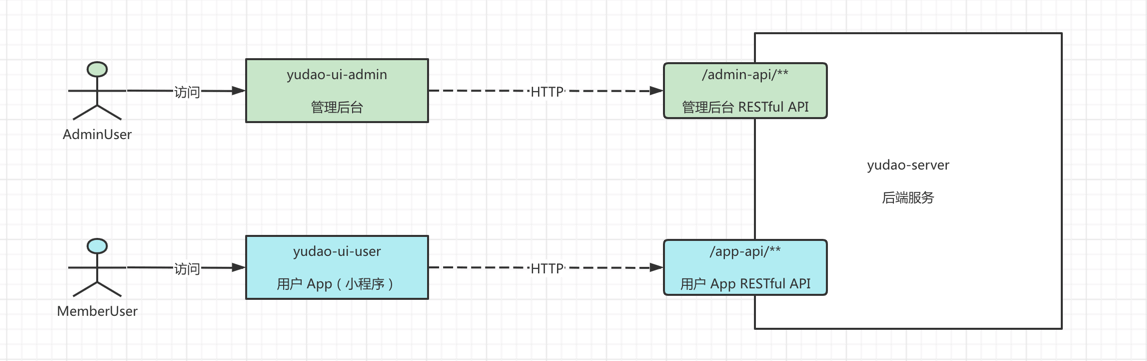
虽然是不同类型的用户,他们访问 RESTful API 接口时,都通过 Token 认证机制,具体可见 《开发指南 —— 功能权限》。
#1. 表结构
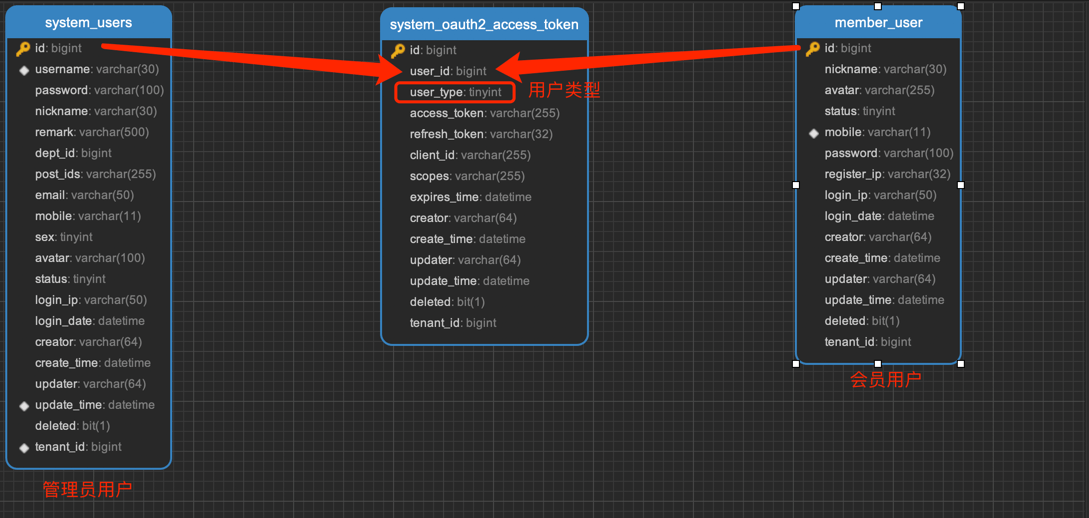
2 种类型的时候,采用不同数据库的表进行存储,管理员用户对应 system_users (opens new window)表,会员用户对应 member_user (opens new window)表。如下图所示:
为什么不使用统一的用户表?
确实可以采用这样的方案,新增 type 字段区分用户类型。不同用户类型的信息字段,例如说上图的 dept_id、post_ids 等等,可以增加拓展表,或者就干脆“冗余”在用户表中。
不过实际项目中,不同类型的用户往往是不同的团队维护,并且这也是绝大多团队的实践,所以我们采用了多个用户表的方案。
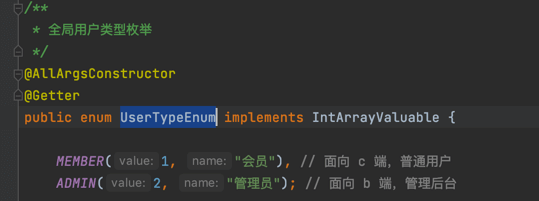
如果表需要关联多种类型的用户,例如说上述的 system_oauth2_access_token 访问令牌表,可以通过 user_type 字段进行区分。并且 user_type 对应 UserTypeEnum (opens new window)全局枚举,代码如下:
#2. 如何获取当前登录的用户?
使用 SecurityFrameworkUtils (opens new window)提供的如下方法,可以获得当前登录用户的信息:
1
2
3
4
5
6
7
8
9
10
11
12
13
14
15
| /**
* 【最常用】获得当前用户的编号,从上下文中
*
* @return 用户编号
*/
@Nullable
public static Long getLoginUserId() { /** 省略实现 */ }
/**
* 获取当前用户
*
* @return 当前用户
*/
@Nullable
public static LoginUser getLoginUser() { /** 省略实现 */ }
|
#3. 账号密码登录
#3.1 管理后台的实现
使用 username 账号 + password 密码进行登录,由 AuthController (opens new window)提供 /admin-api/system/auth/login 接口。代码如下:
1
2
3
4
5
6
7
8
| @PostMapping("/login")
@Operation(summary = "使用账号密码登录")
@OperateLog(enable = false) // 避免 Post 请求被记录操作日志
public CommonResult<AuthLoginRespVO> login(@RequestBody @Valid AuthLoginReqVO reqVO) {
String token = authService.login(reqVO, getClientIP(), getUserAgent());
// 返回结果
return success(AuthLoginRespVO.builder().token(token).build());
}
|
如何关闭验证码?
参见 《后端手册 —— 验证码》 文档。
#3.2 用户 App 的实现
使用 mobile 手机 + password 密码进行登录,由 AppAuthController (opens new window)提供 /app-api/member/auth/login 接口。代码如下:
1
2
3
4
5
6
7
8
| @PostMapping("/login")
@Operation(summary = "使用手机 + 密码登录")
@OperateLog(enable = false) // 避免 Post 请求被记录操作日志
public CommonResult<AppAuthLoginRespVO> login(@RequestBody @Valid AppAuthLoginReqVO reqVO) {
String token = authService.login(reqVO, getClientIP(), getUserAgent());
// 返回结果
return success(AppAuthLoginRespVO.builder().token(token).build());
}
|
#4. 手机验证码登录
#4.1 管理后台的实现
① 使用 mobile 手机号获得验证码,由 AuthController (opens new window)提供 /admin-api/system/auth/send-sms-code 接口。代码如下:
1
2
3
4
5
6
7
| @PostMapping("/send-sms-code")
@Operation(summary = "发送手机验证码")
@OperateLog(enable = false) // 避免 Post 请求被记录操作日志
public CommonResult<Boolean> sendSmsCode(@RequestBody @Valid AuthSendSmsReqVO reqVO) {
authService.sendSmsCode(getLoginUserId(), reqVO);
return success(true);
}
|
② 使用 mobile 手机 + code 验证码进行登录,由 AppAuthController (opens new window)提供 /admin-api/system/auth/sms-login 接口。代码如下:
1
2
3
4
5
6
7
8
| @PostMapping("/sms-login")
@Operation(summary = "使用短信验证码登录")
@OperateLog(enable = false) // 避免 Post 请求被记录操作日志
public CommonResult<AuthLoginRespVO> smsLogin(@RequestBody @Valid AuthSmsLoginReqVO reqVO) {
String token = authService.smsLogin(reqVO, getClientIP(), getUserAgent());
// 返回结果
return success(AuthLoginRespVO.builder().token(token).build());
}
|
#4.2 用户 App 的实现
① 使用 mobile 手机号获得验证码,由 AppAuthController (opens new window)提供 /app-api/member/auth/send-sms-code 接口。代码如下:
1
2
3
4
5
6
7
| @PostMapping("/send-sms-code")
@Operation(summary = "发送手机验证码")
@OperateLog(enable = false) // 避免 Post 请求被记录操作日志
public CommonResult<Boolean> sendSmsCode(@RequestBody @Valid AppAuthSendSmsReqVO reqVO) {
authService.sendSmsCode(getLoginUserId(), reqVO);
return success(true);
}
|
② 使用 mobile 手机 + code 验证码进行登录,由 AppAuthController (opens new window)提供 /app-api/member/auth/sms-login 接口。代码如下:
1
2
3
4
5
6
7
8
| @PostMapping("/sms-login")
@Operation(summary = "使用手机 + 验证码登录")
@OperateLog(enable = false) // 避免 Post 请求被记录操作日志
public CommonResult<AppAuthLoginRespVO> smsLogin(@RequestBody @Valid AppAuthSmsLoginReqVO reqVO) {
String token = authService.smsLogin(reqVO, getClientIP(), getUserAgent());
// 返回结果
return success(AppAuthLoginRespVO.builder().token(token).build());
}
|
如果用户未注册,会自动使用手机号进行注册会员用户。所以,/app-api/member/user/sms-login 接口也提供了用户注册的功能。
#5. 三方登录
详细参见 《开发指南 —— 三方登录》 文章。
#5.1 管理后台的实现
① 跳转第三方平台,来获得三方授权码,由 AuthController (opens new window)提供 /admin-api/system/auth/social-auth-redirect 接口。代码如下:
1
2
3
4
5
6
7
8
9
10
| @GetMapping("/social-auth-redirect")
@Operation(summary = "社交授权的跳转")
@Parameters({
@Parameter(name = "type", description = "社交类型", required = true),
@Parameter(name = "redirectUri", description = "回调路径")
})
public CommonResult<String> socialAuthRedirect(@RequestParam("type") Integer type,
@RequestParam("redirectUri") String redirectUri) {
return CommonResult.success(socialUserService.getAuthorizeUrl(type, redirectUri));
}
|
② 使用 code 三方授权码进行快登录,由 AuthController (opens new window)提供 /admin-api/system/auth/social-login 接口。代码如下:
1
2
3
4
5
6
7
8
| @PostMapping("/social-login")
@Operation(summary = "社交快捷登录,使用 code 授权码")
@OperateLog(enable = false) // 避免 Post 请求被记录操作日志
public CommonResult<AuthLoginRespVO> socialQuickLogin(@RequestBody @Valid AuthSocialQuickLoginReqVO reqVO) {
String token = authService.socialLogin(reqVO, getClientIP(), getUserAgent());
// 返回结果
return success(AuthLoginRespVO.builder().token(token).build());
}
|
③ 使用 socialCode 三方授权码 + username + password 进行绑定登录,直接使用 /admin-api/system/auth/login 账号密码登录的接口,区别在于额外带上 socialType + socialCode + socialState 参数。
#5.2 用户 App 的实现
① 跳转第三方平台,来获得三方授权码,由 AppAuthController (opens new window)提供 /app-api/member/auth/social-auth-redirect 接口。代码如下:
1
2
3
4
5
6
7
8
9
10
| @GetMapping("/social-auth-redirect")
@Operation(summary = "社交授权的跳转")
@Parameters({
@Parameter(name = "type", description = "社交类型", required = true),
@Parameter(name = "redirectUri", description = "回调路径")
})
public CommonResult<String> socialAuthRedirect(@RequestParam("type") Integer type,
@RequestParam("redirectUri") String redirectUri) {
return CommonResult.success(socialUserService.getAuthorizeUrl(type, redirectUri));
}
|
② 使用 code 三方授权码进行快登录,由 AppAuthController (opens new window)提供 /app-api/member/auth/social-login 接口。代码如下:
1
2
3
4
5
6
7
8
| @PostMapping("/social-login")
@Operation(summary = "社交快捷登录,使用 code 授权码")
@OperateLog(enable = false) // 避免 Post 请求被记录操作日志
public CommonResult<AppAuthLoginRespVO> socialQuickLogin(@RequestBody @Valid AuthSocialQuickLoginReqVO reqVO) {
String token = authService.socialLogin(reqVO, getClientIP(), getUserAgent());
// 返回结果
return success(AuthLoginRespVO.builder().token(token).build());
}
|
③ 使用 socialCode 三方授权码 + username + password 进行绑定登录,直接使用 /app-api/system/auth/login 手机验证码登录的接口,区别在于额外带上 socialType + socialCode + socialState 参数。
④ 【微信小程序特有】使用 phoneCode + loginCode 实现获取手机号并一键登录,由 AppAuthController (opens new window)提供 /app-api/member/auth/weixin-mini-app-login 接口。代码如下:
1
2
3
4
5
| @PostMapping("/weixin-mini-app-login")
@Operation(summary = "微信小程序的一键登录")
public CommonResult<AppAuthLoginRespVO> weixinMiniAppLogin(@RequestBody @Valid AppAuthWeixinMiniAppLoginReqVO reqVO) {
return success(authService.weixinMiniAppLogin(reqVO));
}
|
#6. 注册
#6.1 管理后台的实现
管理后台暂不支持用户注册,而是通过在 [系统管理 -> 用户管理] 菜单,进行添加用户,由 UserController (opens new window)提供 /admin-api/system/user/create 接口。代码如下:
1
2
3
4
5
6
7
| @PostMapping("/create")
@Operation(summary = "新增用户")
@PreAuthorize("@ss.hasPermission('system:user:create')")
public CommonResult<Long> createUser(@Valid @RequestBody UserCreateReqVO reqVO) {
Long id = userService.createUser(reqVO);
return success(id);
}
|
#6.2 用户 App 的实现
手机验证码登录时,如果用户未注册,会自动使用手机号进行注册会员用户。所以,/app-api/system/user/sms-login 接口也提供了用户注册的功能。
#7. 用户登出
用户登出的功能,统一使用 Spring Security 框架,通过删除用户 Token 的方式来实现。代码如下:
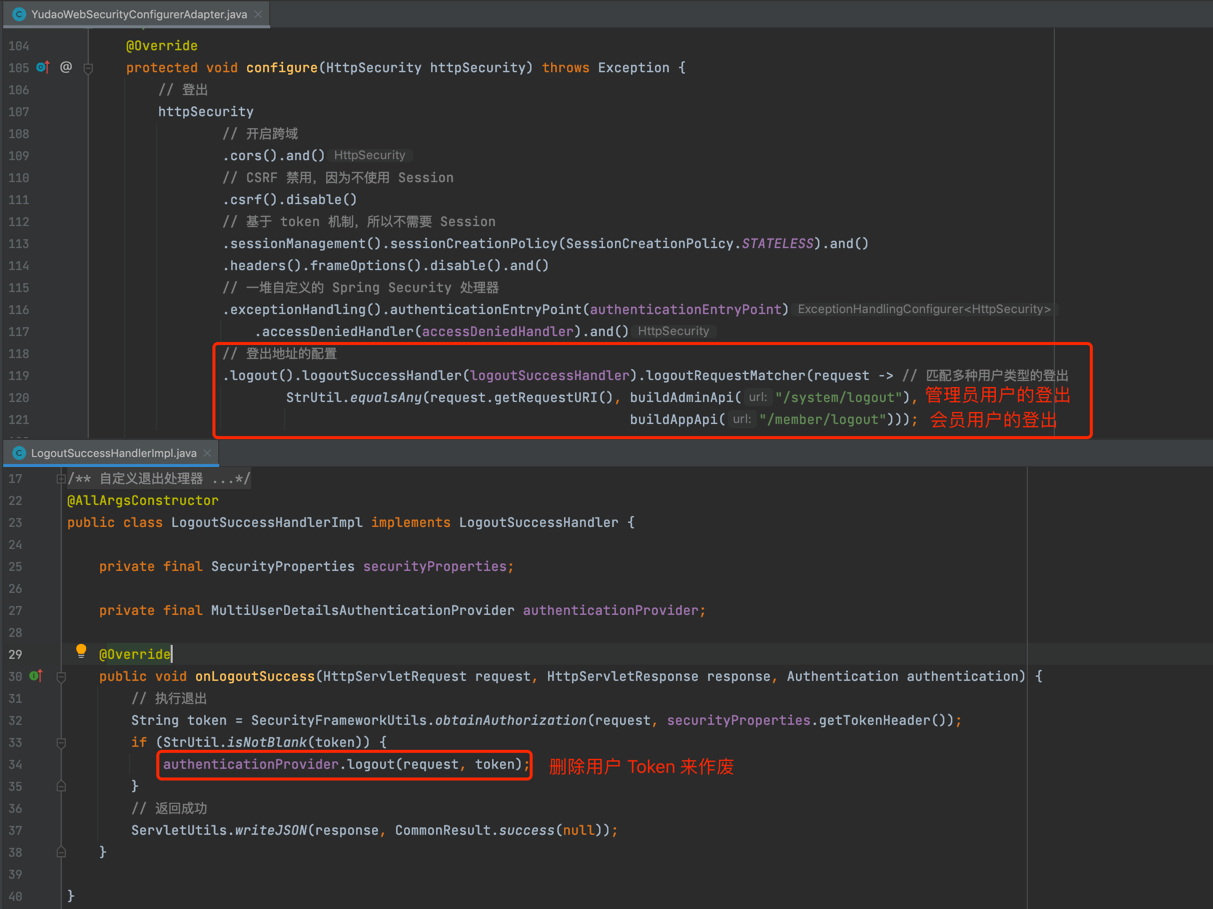
差别在于使用的 API 接口不同,管理员用户使用 /admin-api/system/logout,会员用户使用 /app-api/member/logout。
